Get Prime Numbers - Netbeans Java Codes

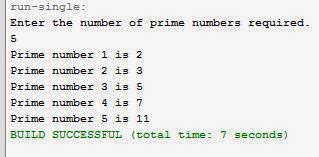
Run-Shot of Prime Numbers

Java Code:

import java.util.Scanner;
public class FirstnPrimeNumbers {
    public static void main(String args[]) {
        Scanner ObjPrime = new Scanner(System.in);
        int n;
        System.out.println("Enter the number of prime numbers required.");
        n=ObjPrime.nextInt();
        int k =1;
        int i,noPrime=0;
        int num =2 ;
        do{
           for(i=2;i<num;i++){
            if(num%i==0)
                noPrime++;   
        }
           i=2;
           if(noPrime==0){
               System.out.println("Prime number "+k+" is "+num);
               k++;
           }
           noPrime=0;
           num++;
        }while(k<=n);
    }

}

[Find more Netbeans Java Code at www.sumikuma.tk]

You can also download text file version of this code: Prime-Numbers_javacode.txt

Comments

Popular posts from this blog

Captcha - Netbeans Java Codes

You can also download text file of this code here:   Captcha.txt Java Code: private void jButton1ActionPerformed(java.awt.event.ActionEvent evt) { // [Find More Java Codes at www.sumikuma.tk] if ("Cleven Eleven".equals(txt1.getText())) JOptionPane.showMessageDialog(this,"You answer is correct"); else JOptionPane.showMessageDialog(null, "You are unsuccessful, Please Try Again"); } How To Display Image? : jLabel1>Properties>Icon>(Under External Image) Import to Image>Select Suitable Image from File Chooser>Select Target Folder>Click Ok> Close the Properties Window. [Find More Java Codes at www.sumikuma.tk]

Javax Code for Playing Music:

Javax Code for Playing Music: OUTPUT: ________________________________________________________________ Just Copy and Paste and Change the variable name respectively: ________________________________________________________________ ________________________________________________________________ Buttons: 1. jButton1 : Open Music File 2. jButton2 : Play 3, jButton3 : Stop 4. jButton4 : Pause ________________________________________________________________ import java.io.File;     import java.io.IOException;     import java.net. MalformedURLException;     import javax.sound.sampled. AudioInputStream;     import javax.sound.sampled. AudioSystem;     import javax.sound.sampled.Clip;     import javax.sound.sampled. LineUnavailableException;     import javax.sound.sampled. UnsupportedAudioFileException; public class Music extends javax.swing.JFrame {     /** ...

Find Factorial -Netbeans Java Code

Run Shot of An Integer to Calculate its factorial Java Code: import java.util.Scanner; public class Factorial { public static void main(String args[]) { int n, c, fact = 1; System.out.println("Enter an integer to calculate it's factorial"); Scanner in = new Scanner(System.in); n = in.nextInt(); if ( n < 0 ) System.out.println("Number should be non-negative."); else { for ( c = 1 ; c <= n ; c++ ) fact = fact*c; System.out.println("Factorial of "+n+" is = "+fact); } } } Find more netbeans java code from www.sumikuma.tk You can also download text file version of this code: Factorial.txt